How to sell corporate holiday party balloons with one printable catalog
Corporate holiday parties can be some of the best bookings of your season. The dates are set early, planners like having a go-to vendor and one happy office manager can bring you back year after year.
But the person booking usually isn't a decor person. They're probably an administrative assistant who's also juggling the caterer, the venue and a list of who can't eat what. They want to pick something good, get it approved and move on.
A holiday catalog makes that easy for them (and you).
What a holiday catalog is
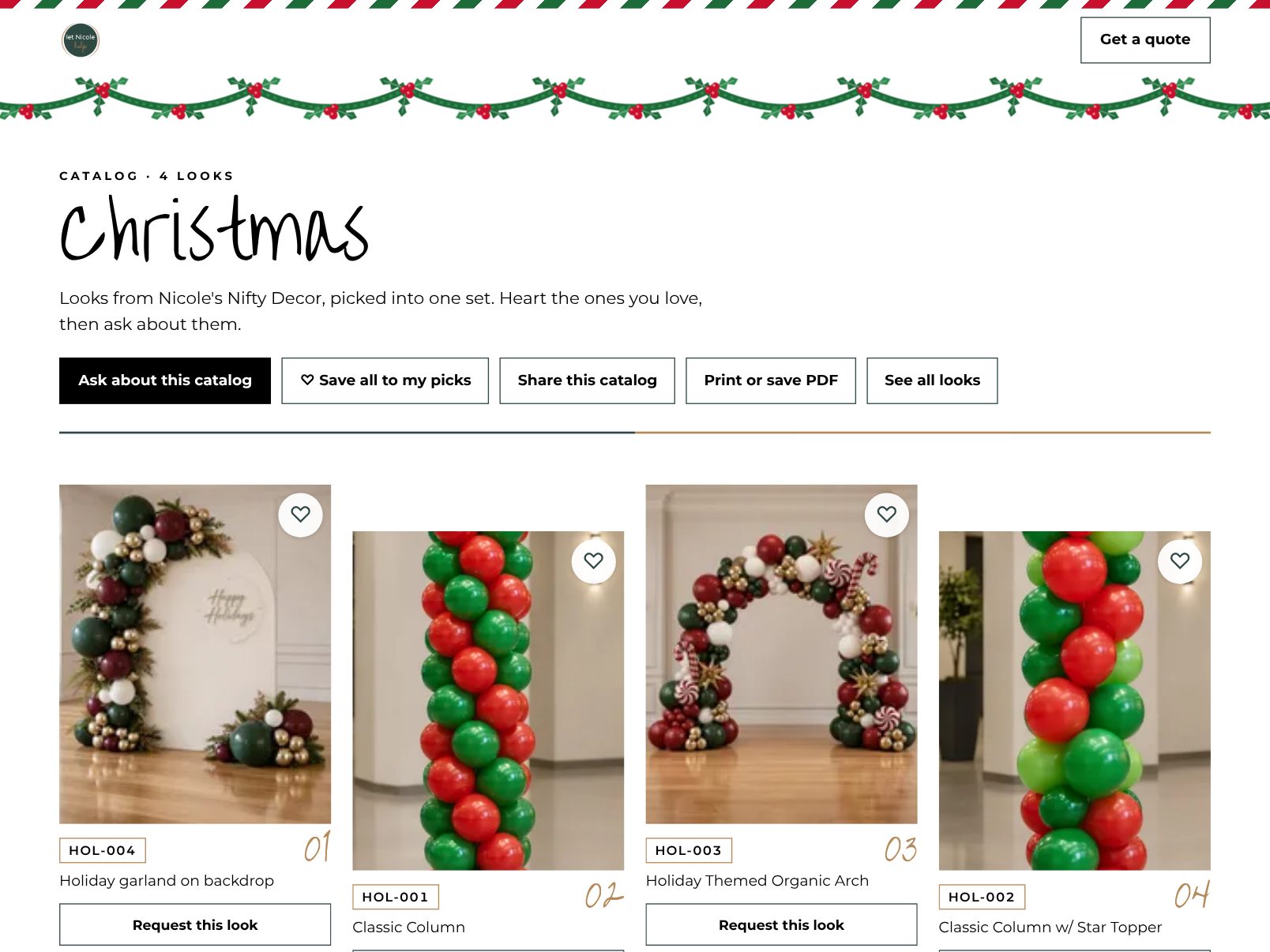
In Celebration Catalog, a catalog is a set of looks you pin to your page. Think of it as your curated holiday collection: the setups you'd love to build for an office party over and over.
You choose the looks, give the catalog a seasonal background and pin it to your page. Every look keeps its own code, so a planner can point to the exact look instead of trying to describe it.
Pick looks that fit an office
Before you start pinning, think about where these parties actually happen: conference rooms, restaurant private rooms, hotel ballrooms, the open space by the break room. A strong corporate holiday catalog might include:
- A photo backdrop in classic red and green, or in a company's colors
- A garland that runs along a buffet or bar
- A pair of columns to frame an entrance
- Marquee letters for the year or the company's initials
- A smaller, simpler option for the team that wants something festive but low key
- One showstopper, like a full organic arch, for the party with room to go big
Mix sizes on purpose. The planner needs something they can get approved, and something to point at when someone says "go bigger."
Write captions for a non-decor person
Your captions do the explaining you'd normally do on a call. When you add looks from your phone's photo album, you pick the occasion and add a caption. For corporate looks, a good caption covers:
- Roughly how much space it needs
- Whether it works indoors in a smaller room
- How it can shift into company colors
Keep the balloon jargon light here. "Organic garland" is fine; how many 5 inch balloons go into each cluster is not something an office manager needs to know.
Print it and leave it behind
This is the part that turns a link into something that sits on a desk.
A catalog can be printed or saved as a PDF, and it includes a QR code that leads back to the catalog online. That opens up easy, low pressure ways to get in front of planners:
- Drop it off. Bring printed copies to offices, coworking spaces and businesses you've worked with before.
- Leave it at venues. Restaurants and hotels that host holiday parties are often happy to have something to hand planners.
- Email the PDF. Past corporate clients get a short note with the PDF attached. One email, nothing to dig through.
- Bring it to networking events. A printed catalog is easier to hand someone than explaining your services in a crowded room.
- Tuck it in deliveries. If you're already setting up somewhere in November, leave a copy behind.
When someone scans the QR code, they land on the catalog, where they can browse, heart the looks they like and send you a request that names those exact looks.
Let the planner share it with the decision makers
Office parties rarely have just one decision maker. There's the planner, their boss and quite possibly a committee.
When a planner hearts looks on your page, those become a mood board they can name and share as one link. So instead of forwarding a PDF and a handful of screenshots up the chain, they send one link, everyone sees the same options and the planner comes back to you with an answer.
Timing it right
Corporate planners often start thinking about holiday parties before Halloween is over. If you can, have your holiday catalog built and printed by early November.
If you're reading this later than that, it's not too late. Plenty of offices plan in a hurry, and a ready-made set of options is exactly what a rushed planner wants. And if you build a new kind of setup in the first week of December, add it to the catalog while it's fresh!
Start with five looks
You don't need a perfect collection to begin. Pick five holiday or winter setups you're proud of, pin them as a catalog and print one copy to see how it feels in your hand. If you'd like to see how your looks show up for customers first, peek at the demo gallery.